
Employee Engagement Software for Driving Performance
Keep frontline teams informed, trained, and recognized
Email and desktop portals miss people on the floor. SkillSmith reaches them during the shift through mobile, SMS, QR, and shared devices - then ties updates to training, recognition, and completed work.
You'll love your
custom demo!

Review a setup built around your sites. Watch a personalized demo.
Trusted by 300+ Organizations
Built on SOC 2 Type II, GDPR, and CCPA standards. Used by multi-site teams that need one way to reach staff across stores, sites, and shifts.






Solutions tailored to your industry
Select your industry to see how SkillSmith helps managers reach shift teams and keep engagement on the floor.
Contact us today to review our work with

Improve internal communication across store teams
Managers can send schedule changes, product notes, and store alerts by mobile or SMS. Each message can go to a store or shift, with read tracking so leaders know the update reached the floor.
 Shift messaging
- SMS alerts
- Store targeting
- Read tracking
- Two-way replies
- Multi-site send
2x higher message reach when store updates go to mobile and SMS
How SkillSmith Compares
Take a side-by-side look at capabilities, integrations, and customization limits
| Features |  | BeeKeeper | YOOBIC | Yourco |
|---|---|---|---|---|
| Pay for completed workflows, not every worker seat | | |||
| Multi-interface access (QR + SMS + kiosk + mobile app) | | Limited | Limited | Limited |
| Gift cards and points tied to completed work | | Limited | ||
| Communication, training, recognition, and rewards in one system | | Limited | Limited | Limited |
Pay only for completed work
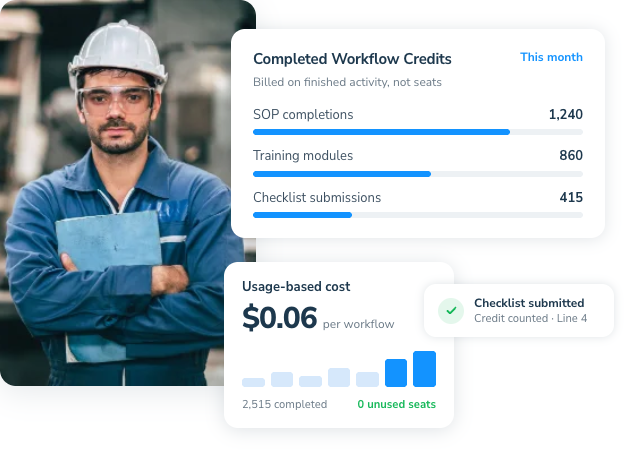
Stop paying for every worker seat whether they use the system or not. SkillSmith prices around completed messages, training, surveys, and recognition activity, so cost stays tied to real frontline work.
- Usage credits
- Completed submissions
- Cost control
- Activity tracking
- Site visibility
- Workload reporting
Featured Use Cases 
Fund active store programs
Scale seasonal hospitality crews
Control multi-site engagement spend
Reach teams across more channels
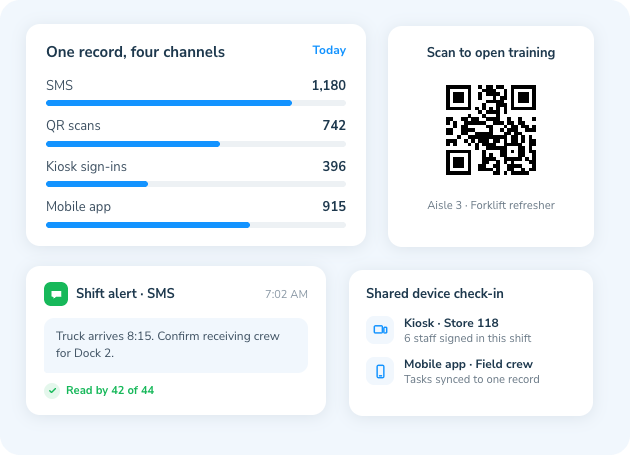
Give staff a way to get updates and complete work through QR, SMS, kiosk, or mobile app. Managers still get one record, even when teams are spread across stores, sites, and shifts.
- QR access
- SMS messaging
- Kiosk login
- Mobile app
- Read tracking
- Shared devices
Featured Use Cases
Send shift alerts by SMS
Open training from QR
Complete tasks on shared devices
Reward completed frontline work
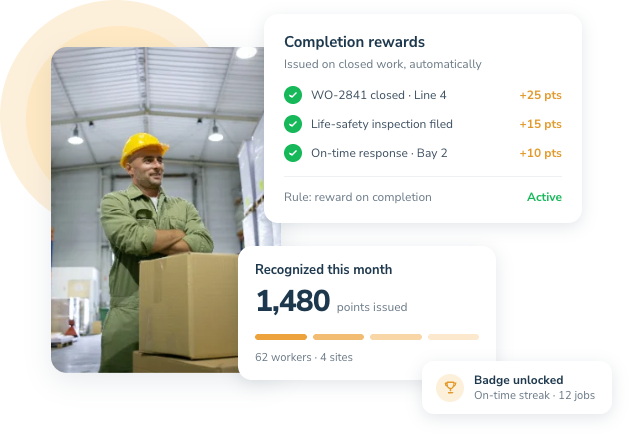
Issue points or gift cards when training, tasks, or goals are finished. Fulfillment can run automatically, so recognition is tied to real work instead of a separate payout process.
- Points payout
- Gift cards
- Reward catalog
- Goal rules
- Auto fulfillment
- Reward history
Featured Use Cases
Reward finished onboarding
Pay out training incentives
Recognize completed shift goals
Keep communication and rewards together
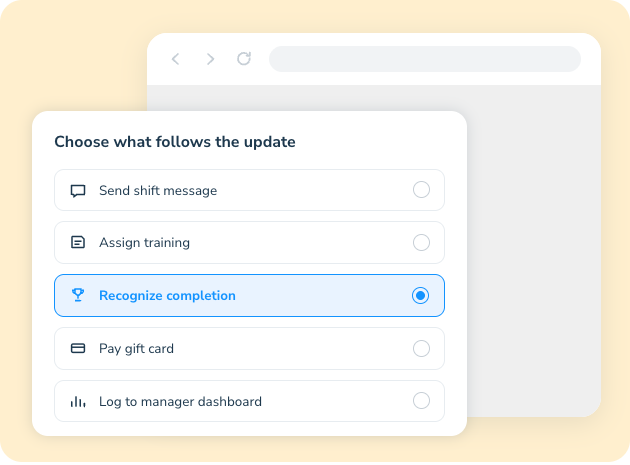
Combine messaging, training, recognition, and payouts in one workflow. Managers do not need one tool for updates and another tool to reward the work that followed.
- Shift messaging
- Training assignments
- Staff recognition
- Incentive payouts
- Activity records
- Manager dashboards
Featured Use Cases
Message then train store teams
Recognize completed service work
Reward follow-through after updates
Meet Our Practice Leaders
Our practice leaders help operations and HR teams reach people who work on the floor, not at a desk. They set up communication, onboarding, training, and recognition so managers can see what happened across stores, sites, and shifts.




Built for Frontline Maintenance Work
Why Operations Teams Are Replacing Paper Tickets and Requests
SkillSmith is designed for sites where staff need a fast way to report issues and supervisors need work-order records they can trust. It supports request intake, job tracking, equipment checks, and completion updates across QR, SMS, mobile, and shared devices.
 01
01Pay-Per-Submission
Pay only for completed maintenance work. Credits cover work orders, inspections, request closeouts, and related job activity.
 02
02100% Customizable
Build workflows around the way your sites actually report and close work. No locked templates that force every request into someone else’s process.
 03
03Multi-Channel Field Access
Reach teams through QR, SMS, kiosk, or mobile app based on how each site works. Request and completion records still land in one place.
 04
04Permanent Data Access
Keep full access to work-order history, inspection records, and closeout data — even after configuration and rollout are done.
From First Report to Closed Record
The Work Order Lifecycle
Setup & Configuration
Your SkillSmith account manager helps upload request forms, set permissions, and map how work orders should move from intake to close across your sites.
Execution & Data Collection
Staff submit requests, inspections, and job updates from mobile, QR, or SMS. Credits are used as work is submitted, and each job keeps a complete record.
Real-Time Tracking
Supervisors use dashboards to watch open requests, response times, and bottlenecks. Teams can see what is waiting, in progress, or overdue.
Handover & Archiving
Completed work orders, inspection records, and closeout data stay available to your internal team. Even after active credit usage stops, the history remains accessible.

Client Success Stories
Real Impact, Measurable Results


Brittany Harter
Social Media Manager - Cleveland, OH

Mary Veloske
Vice President of Operations, National QSR Chain


Paul Hildebrand
Director of HSE/DOT
Brittany Harter
Social Media Manager - Cleveland, OH
Mary Veloske
Vice President of Operations, National QSR Chain
Paul Hildebrand
Director of HSE/DOT
Brittany Harter
Social Media Manager - Cleveland, OH
See Live Examples of How We Help
Learn how SkillSmith helps managers reach shift teams with updates, training, recognition, and rewards across sites.

Send Store Alerts
Managers send schedule and product updates to associates by mobile or SMS during the shift.

Share Service Notes
Hotel leads send 86s and room notes to the right shift while service is running.

Alert Floor Crews
Warehouse supervisors send dock and labor changes to teams without relying on email.

Notify Unit Staff
Care-site leads send staffing updates to a unit and confirm the message was received.

Push Line Messages
Plant supervisors send labor moves and shift notes to operators working on the floor.

Reach Field Crews
Site leads send production notes to processing and field teams during the workday.

Target One Shift
Managers send an update only to the opening, closing, or overnight crew.

Track Message Receipt
Leaders see which store, site, or unit staff received and opened the message.

Collect Two-Way Replies
Staff can reply to an alert so managers know the update was understood.
Frequently Asked Questions
Yes. Managers can send updates, assign short training, and recognize completed work while the shift is running. Staff can respond from a phone or shared device without leaving the floor for a long classroom session.
Yes. Managers can target a site, role, or shift instead of sending every update to the whole company. Read tracking then shows whether that group received the message.
You can use public shout-outs when you want the team to see the recognition, and keep manager-level records when you only need a history for supervisors. Both stay attached to the person and site.
Recognition is the visible praise, badge, or feed item. Rewards are the points, gift cards, or catalog payout that can follow a completed action. You can run one, the other, or both.
HR integration can sync the current roster so messages, training, and rewards follow active employees. That reduces the risk of sending updates or payouts to people who are no longer at the site.
Ready to boost frontline employee engagement?
Give managers one way to reach shift teams with updates, training, recognition, and rewards. Request a demo now.